
Values to record when comparing server power profiles
Check both whether power consumption was reduced and whether the necessary tasks were completed. Even if profile names are the same, settings may vary by device. After identifying the devices, tasks, and observation periods to be compared, record power consumption, throughput, and response time side by side.
What is a power profile?
ENERGY STAR describes power management as a feature that adjusts the operation of server components based on workload. This may include CPU speed control or idle core management, and a power profile is a set of various power management settings. Profile names and actual configurations vary by manufacturer.
Therefore, do not assume that other servers operate in the same way based solely on names such as “Balanced” or “Max Performance.” First, check the descriptions provided by the equipment manufacturer and the specific version of the operating system.
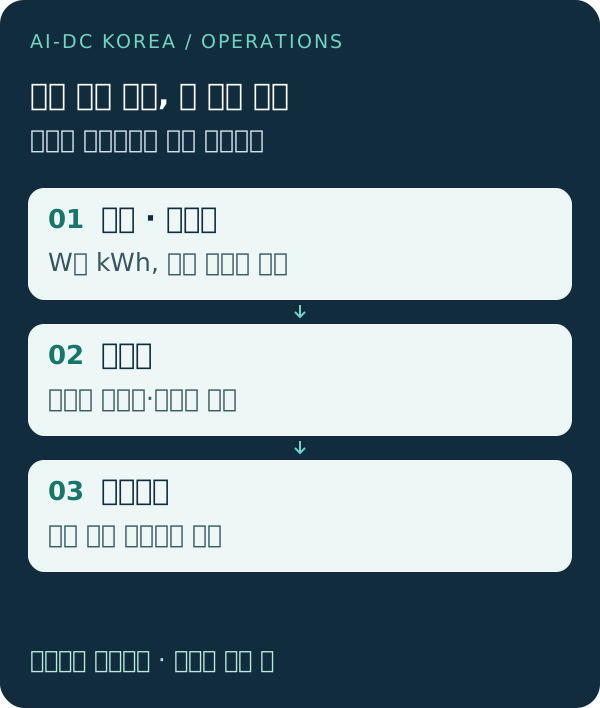
Test conditions to be fixed prior to comparison
Below is what AI-DC KOREA proposes: Internal Comparison FrameworkThis is not a list of recommended settings for specific servers or actual performance test results.
- Equipment: List the model, configuration (such as CPU and memory), and firmware and operating system versions.
- Settings: List the names of existing and test profiles, the specific items that are changing, and whether the settings are configured in the hardware or the operating system.
- Responsibilities: List the types and volumes of requests and tasks to be tested, as well as other tasks running simultaneously.
- Time: Record the start and end times of tests, the data collection intervals, and any missing measurement intervals.
- Restored: First, determine the acceptable level of operational impact, the conditions under which testing should be halted, and the procedure for reverting to the original settings.
Please refer to the same table for power, throughput, and response time.
| Comparison Criteria | Existing settings | Test Configuration |
|---|---|---|
| Profile and Changes | Names and Individual Configuration Records | Names and Records of Changed Settings |
| Operational and Monitoring Period | Operating Conditions and Start/End Times | Whether conditions are the same and any differences |
| Power W | Unmeasured · Measurement Location Record | Unmeasured · Same location confirmed |
| Energy (kWh) | Unmeasured · Cumulative Period Records | Check for unmeasured and cumulative periods |
| Throughput | Unmeasured items, number of tasks, hours worked, etc. | Unmeasured · Same unit |
| Response time | Unmeasured Items, Units, and Aggregation Criteria | Unmeasured · Same aggregation criteria |
| Business Impact and Recovery | Current Service Requirements | Compliance with requirements and restoration records |
“W” refers to power, while “kWh” refers to the energy consumed over a specific period of time. Do not compare instantaneous power and cumulative energy over a period as if they were the same value. Also, clearly distinguish between values with different measurement ranges, such as those from internal server sensors and those from rack-level meters.
Given these results, what would you check first?
If power has decreased and throughput has also decreased, you must distinguish between changes in workload and the effects of configuration. Even if throughput remains the same, if response times or errors exceed business requirements, reflect that impact in your assessment. If data for one side is missing, do not calculate the difference as 0; instead, leave it as “not measured.”
Include not only the “configuration name” in the results but also details on the specific operations, equipment, and time period during which the observations were made. A single test does not guarantee energy savings for other equipment or the entire data center. Whether to apply the results on-site is determined in accordance with the organization’s approved test, change, and recovery procedures.
Frequently Asked Questions
Should I enable the power-saving profile on all servers?
This guidance does not recommend blanket changes. Organizations should verify the manufacturer’s specifications and operational requirements, test within approved parameters, and then decide whether to implement the changes.
Can I use a comparison table that does not include savings rates?
This can be used as preparatory material to organize the scope of measurement and unconfirmed items. Do not include reduction rates or cost-effectiveness figures without actual measurements.
Please organize the materials and questions to be reviewed.
You can begin a consultation by providing links to publicly available data, the reference date, and any unverified items. The scope and process of the consultation will be confirmed after your inquiry. KakaoTalk Consultation: Daily 9:00 AM–6:00 PM. Simply opening the chat window does not constitute a submitted inquiry.